Set up the membership you sell.
Create one-time, recurring or lifetime packages from the staff workspace. Manage their prices, availability and billing settings in one place.
I built RoleHarbor end to end: a ReactJS member app, staff workspace and billing-to-Discord backend. The hosted system runs on Cloudflare Workers with PostgreSQL, connecting membership packages, Stripe payments and role access for one business.
Member web app, staff workspace, provider configuration, authentication, billing, Discord access, SQL data model, testing and deployment.
End-to-end developer · Product flows, web app, backend, SQL and deployment
ReactJS / TypeScript / Node.js / Hono / Cloudflare Workers / PostgreSQL / Hyperdrive / Cloudflare Queues / Stripe / Discord API / MySQL
Stripe test mode. No real charges. Shared Owner, Administrator and Viewer accounts are listed on the staff sign-in page.
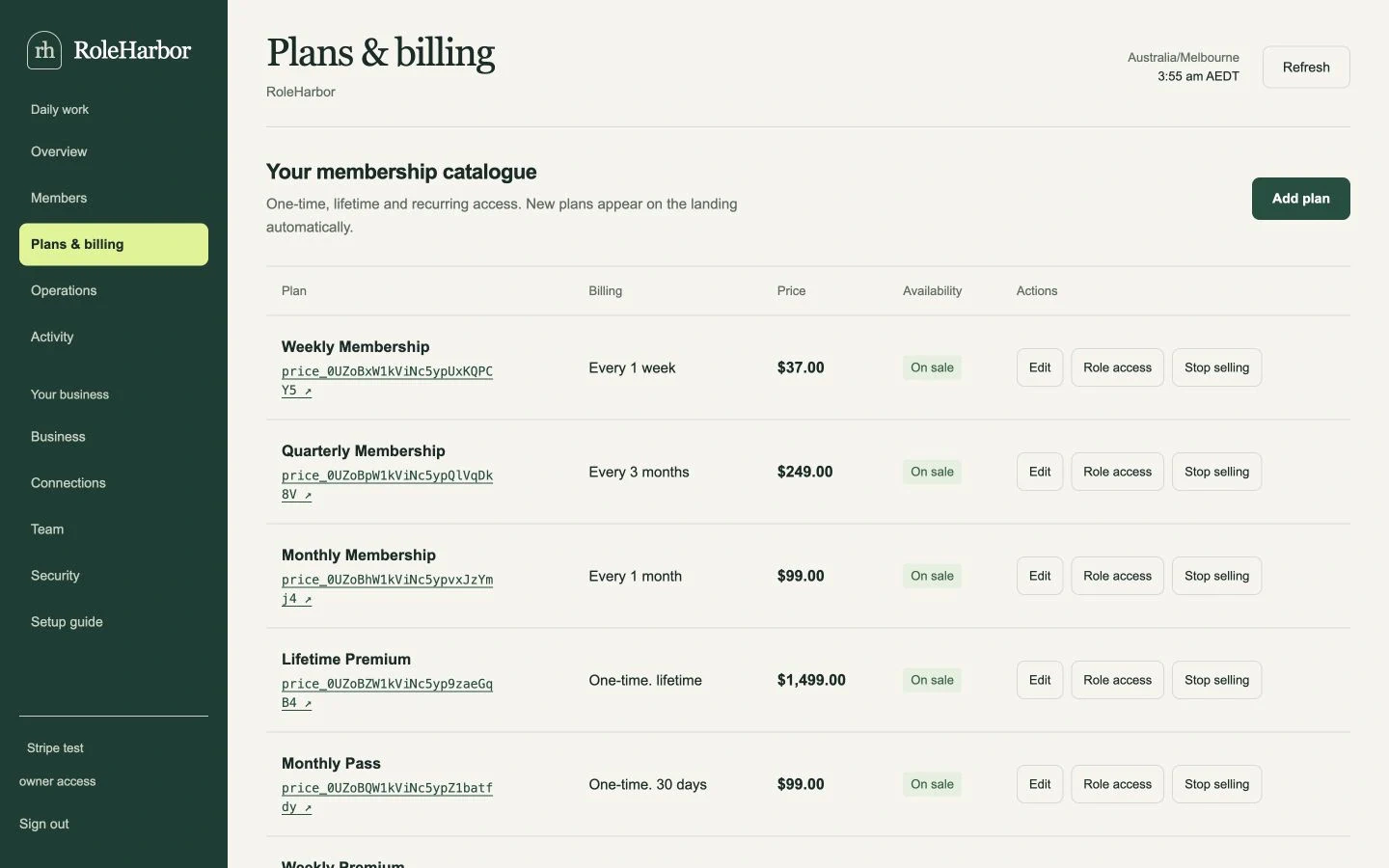 Actual hosted staff workspace / Stripe test mode
A successful payment does not guarantee that a member can open the right Discord channels. The business needs clear package rules, a record of what was paid for and a way to recover failed access updates without granting the wrong permissions.
I designed and built the member and staff journeys, ReactJS interfaces, API, database model and background work. My work includes Stripe billing, Discord role and room mapping, staff permissions, MFA, recovery flows, tests and the Cloudflare deployment.
RoleHarbor serves one business and one Discord server. Try the member journey or sign in as Owner, Administrator or Viewer. The demo uses Stripe test mode; no real charges are collected. Discord uses the configured demo server.
Shared password: RoleHarbor@Demo
These public accounts keep fixed sign-in details. They cannot change staff accounts, passwords or MFA. Private staff accounts retain the full team and security controls.
Sign in as Owner, open Connections and choose Reset demo. Enter the shared password, then select Restore default connections.
This restores the saved Stripe test keys and Discord connection settings. It keeps members, payments, plans and activity. It does not undo Discord room changes, reverse payments or reset the whole workspace.
This is a shared workspace, so other visitors may change its records. Use test information when trying an editable role.
Members choose a package and connect Discord. Staff manage packages, member records and access in a separate workspace.
Create one-time, recurring or lifetime packages from the staff workspace. Manage their prices, availability and billing settings in one place.
Map a package to a Discord role and choose the rooms it can open. Preserve unrelated roles and permissions when membership access changes.
A paid invoice and a delivered role have their own records. Staff can inspect a failed job, fix the cause and retry against the member’s current eligibility.
Renewals update access from paid invoice periods. Stopping future renewals keeps access through the paid period; expiry removes the membership role when eligibility ends.
Owners manage business and provider settings, admins handle membership operations and viewers have read-only access. Private staff accounts support team management, authenticator MFA and recovery codes; public demo accounts keep those settings fixed.
Expiry notices go to the member by Discord DM, with billing email as a fallback when DMs are closed. Personal payment and expiry details stay out of shared channels.
Choose a shared Owner, Administrator or Viewer account from the sign-in page. The server checks each role’s permissions, and shared sign-in and staff/security settings stay fixed.
An Owner can restore the saved Stripe test keys and Discord connection settings. The reset preserves member, payment and plan records and does not undo changes to Discord rooms.
Open a screen for a closer look.
Staff workspace · Stripe test captures
From the customer journey to the details.
A clear purpose behind each part.
I mapped purchases, renewals, cancellations, refunds and expiry, then defined the member journey, staff permissions and the records needed to explain access.
I built the public package catalogue and connected staff workspace, including member records, package settings, billing history, access activity and operations.
I implemented Stripe event handling, membership eligibility and Discord delivery with durable SQL records and retryable jobs. The hosted app uses PostgreSQL through Hyperdrive; the source also has a MySQL adapter.
I added owner, admin and viewer permissions, staff invitations, MFA, recovery codes and protected provider configuration. Member notifications use private channels.
I tested membership and access rules, repeated payment events, refunds, expiry, staff permissions and failed-job recovery. I also checked the member and staff flows on desktop and mobile, including keyboard navigation.
I deployed the application to Cloudflare Workers with Hyperdrive, queues and scheduled recovery. I documented configuration, backups, restore checks and the steps staff take when delivery needs attention.
The features come together around the work people need to do.
This installation serves one business and one Discord server. RoleHarbor runs in a modern browser with JavaScript enabled and does not require a particular operating system. The public demo uses Stripe test mode; no real charges are collected. Shared staff accounts keep fixed sign-in and team/security settings. Reset demo restores saved Stripe test and Discord connections; it does not reset records or reverse Discord room changes.
The payment starts a membership update, with the purchase details attached to the work that follows.
Membership package
↗